6 minutes
Containerd under the hood
Phase 1: runc Raw — Zero Tooling
so what we’ll do in this phase is exactly what containerd does internally
me (manually) vs containerd (automatically) ─────────────────────────────────────────────────────────
- Create rootfs → pulls image layers
- Write config.json → generates OCI bundle
- Call runc run → calls runc via shim
- Watch cgroups appear → same thing happens
first i installed containerd
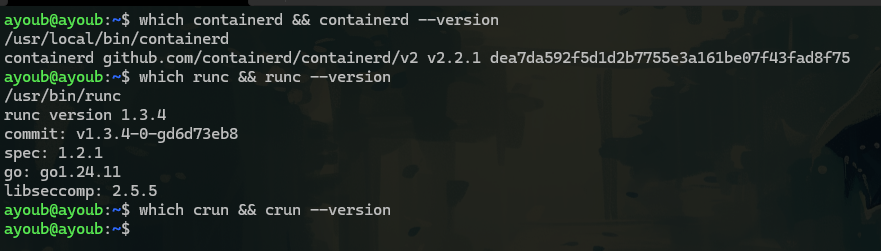 so it’s automatically we can see that we have runc but not crun, (so the default OCI implementation in containerd is runc)
now net’s let’s build a container with our hands:
1- so first we should create a OCI bundle structure (don’t worry it’s a package image contain rootfs the thing that we want and other stuff metadata … )
mycontainer/
├── rootfs/       ← the container's filesystem (what it sees as root "/")
└── config.json   ← the OCI spec (namespaces, cgroups, what process to run)
for the rootfs , i used busybox it’s a coi it’s a good choice as a linux userspace
so let’s pull the image and export it in /tmp

sudo ctr images export /tmp/busybox.tar docker.io/library/busybox:latest
after exporting we get busybox.tar

i used ctr -> cuz i don’t have docker :)

so after exporting the tar we can see a blobs right (it’s the actual file system but compressed and hashed) as you can see

so now we should know which one is the metadata : env, vars, … and the the one who acualy the file system : /bin /etc /dev ….
so let’s check the manifest.json to know
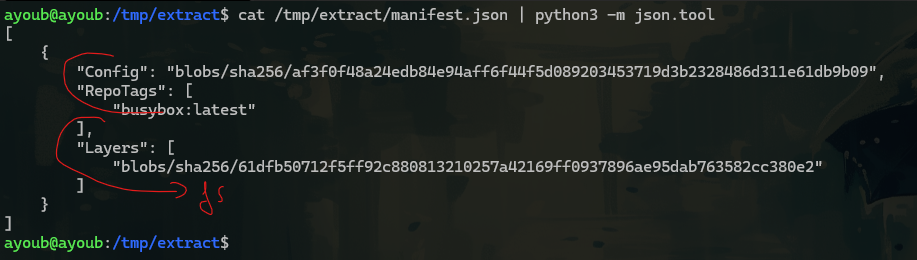 so our FS is 61dfb….
now let’s unpacks the compressed FS into our rootfs

Nice that is a complete Linux filesystem. No Docker. No Kubernetes. Just a tar blob from an OCI image, extracted by our hands into a directory
that’s exaclly what containerd did internally (i was happy i just asked chatget i did exactly waht container d doeas with overlayFS intel it tell me , relax habibi you only have one layer , you use just busybox -> no multiple layer :)
now we done from rootfs but MISSING — the OCI spec (namespaces, cgroups)
so actually we can generate it with runc (built-in command)
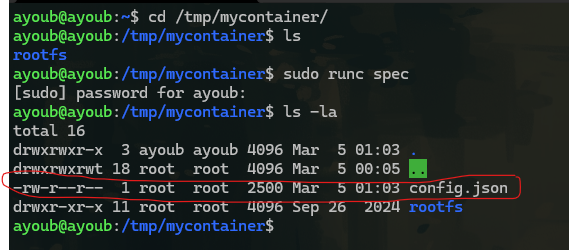 it’s looks like
{
        "ociVersion": "1.2.1",
        "process": {
                "terminal": true,
                "user": {
                        "uid": 0,
                        "gid": 0
                },
                "args": [
                        "sh"
                ],
                "env": [
                        "PATH=/usr/local/sbin:/usr/local/bin:/usr/sbin:/usr/bin:/sbin:/bin",
                        "TERM=xterm"
                ],
                "cwd": "/",
                "capabilities": {
                        "bounding": [
                                "CAP_AUDIT_WRITE",
                                "CAP_KILL",
                                "CAP_NET_BIND_SERVICE"
                        ],
                        "effective": [
                                "CAP_AUDIT_WRITE",
                                "CAP_KILL",
                                "CAP_NET_BIND_SERVICE"
                        ],
                        "permitted": [
                                "CAP_AUDIT_WRITE",
                                "CAP_KILL",
                                "CAP_NET_BIND_SERVICE"
                        ]
                },
                "rlimits": [
                        {
                                "type": "RLIMIT_NOFILE",
                                "hard": 1024,
                                "soft": 1024
                        }
                ],
                "noNewPrivileges": true
        },
        "root": {
                "path": "rootfs",
                "readonly": true
        },
        "hostname": "runc",
        "mounts": [
                {
                        "destination": "/proc",
                        "type": "proc",
                        "source": "proc"
                },
                {
                        "destination": "/dev",
                        "type": "tmpfs",
                        "source": "tmpfs",
                        "options": [
                                "nosuid",
                                "strictatime",
                                "mode=755",
                                "size=65536k"
                        ]
                },
                {
                        "destination": "/dev/pts",
                        "type": "devpts",
                        "source": "devpts",
                        "options": [
                                "nosuid",
                                "noexec",
                                "newinstance",
                                "ptmxmode=0666",
                                "mode=0620",
                                "gid=5"
                        ]
                },
                {
                        "destination": "/dev/shm",
                        "type": "tmpfs",
                        "source": "shm",
                        "options": [
                                "nosuid",
                                "noexec",
                                "nodev",
                                "mode=1777",
                                "size=65536k"
                        ]
                },
                {
                        "destination": "/dev/mqueue",
                        "type": "mqueue",
                        "source": "mqueue",
                        "options": [
                                "nosuid",
                                "noexec",
                                "nodev"
                        ]
                },
                {
                        "destination": "/sys",
                        "type": "sysfs",
                        "source": "sysfs",
                        "options": [
                                "nosuid",
                                "noexec",
                                "nodev",
                                "ro"
                        ]
                },
                {
                        "destination": "/sys/fs/cgroup",
                        "type": "cgroup",
                        "source": "cgroup",
                        "options": [
                                "nosuid",
                                "noexec",
                                "nodev",
                                "relatime",
                                "ro"
                        ]
                }
        ],
        "linux": {
                "resources": {
                        "devices": [
                                {
                                        "allow": false,
                                        "access": "rwm"
                                }
                        ]
                },
                "namespaces": [
                        {
                                "type": "pid"
                        },
                        {
                                "type": "network"
                        },
                        {
                                "type": "ipc"
                        },
                        {
                                "type": "uts"
                        },
                        {
                                "type": "mount"
                        },
                        {
                                "type": "cgroup"
                        }
                ],
                "maskedPaths": [
                        "/proc/acpi",
                        "/proc/asound",
                        "/proc/kcore",
                        "/proc/keys",
                        "/proc/latency_stats",
                        "/proc/timer_list",
                        "/proc/timer_stats",
                        "/proc/sched_debug",
                        "/sys/firmware",
                        "/proc/scsi"
                ],
                "readonlyPaths": [
                        "/proc/bus",
                        "/proc/fs",
                        "/proc/irq",
                        "/proc/sys",
                        "/proc/sysrq-trigger"
                ]
        }
}
this file present all roles of a container that follow , cgroups, mounts, namespaces , capabilities(what allow and what not ) …
even containers has UID 0, that not mean it has all 40 capablities like root
=> what provides resource limits ? => well nothing yet…
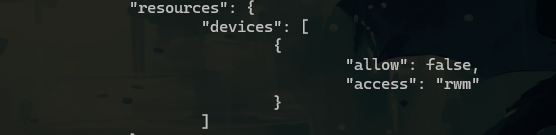
so now we’ll Add a Memory Limit to config.json
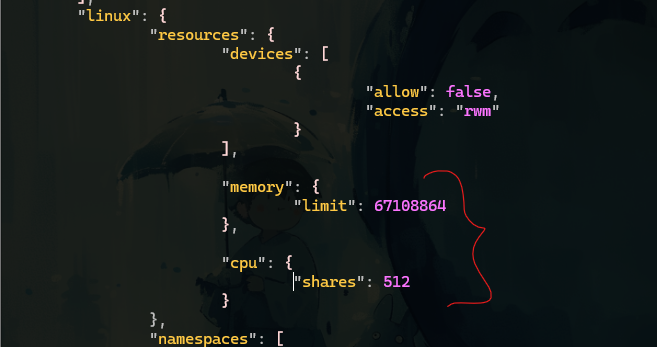
i added memo and cpu
now we can run the container and see cgroups appear live
in Terminal 2:

now we have nothing
 lets run
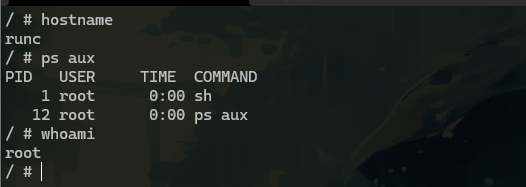
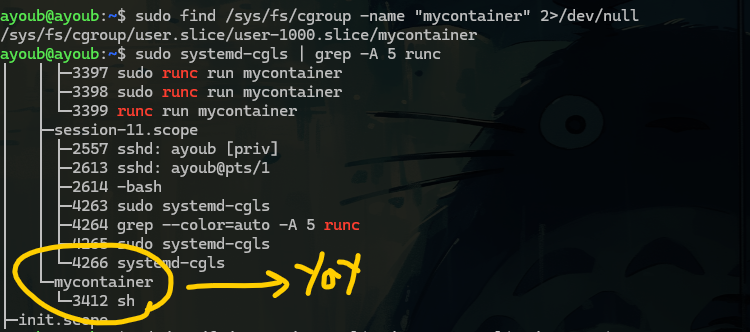
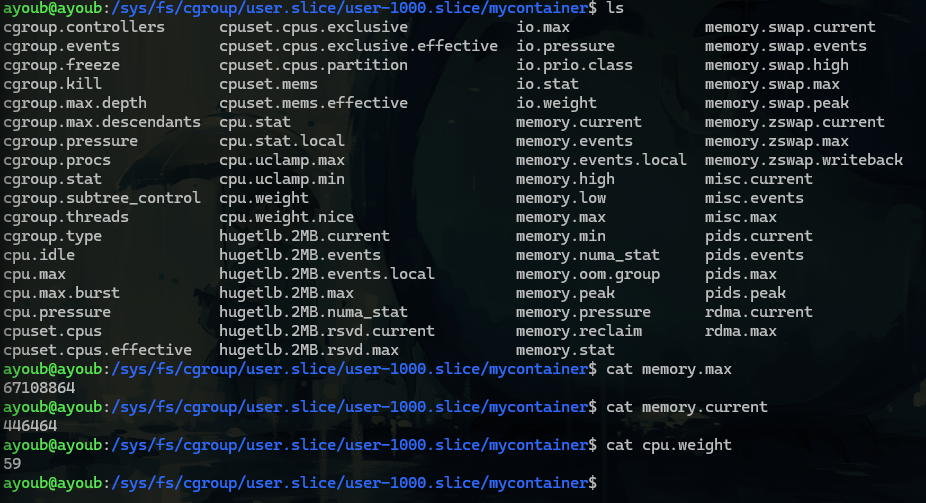
config.json              cgroup v2 kernel file        value
─────────────────────────────────────────────────────────────
"memory.limit": 67108864  →  memory.max          =  67108864
"cpu.shares":   512        →  cpu.weight          =  59
                              memory.current      =  live usage
let’s simulate the The OOM Kill :)

nice we just simulate now if we get a k8s output like
kubectl describe pod mypod

Last State: Terminated
  Reason: OOMKilled        ← THIS is what i just saw
  Exit Code: 137           ← 128 + 9 (SIGKILL)
so we saw exactly what happened at the kernel level :)
Phase 1 Complete ✅
Phase 2 — containerd Takes the Wheel
In Phase 1 i manually:
- Pulled the image
- Extracted layers into rootfs
- Wrote config.json
- Called runc directly
Now we let containerd do all of that , and we’ll spy on it to see exactly what it does under the hood.
in terminal 1 we’ll run our pulled image busybox, called mycontainer2 and in the terminal 2 we’ll see ps tree live

runc is already gone. It did its job — created namespaces, set up cgroups, launched sh — and exited. The shim took ownership of the container process. This is the entire point of the shim architecture
so we run our container -> containerd prepared the OCI bundle -> containerd spawned : containerd-shim-runc -> shim called runc to run -> runc (- created namespaces, - setup cgroupces, - pivot root into rootfs, execve sh, - and exited ) -> shim (7169) holds sh (7191) alive containerd monitors shim via Unix socket
let’s see the OCI bundle generated by containerd
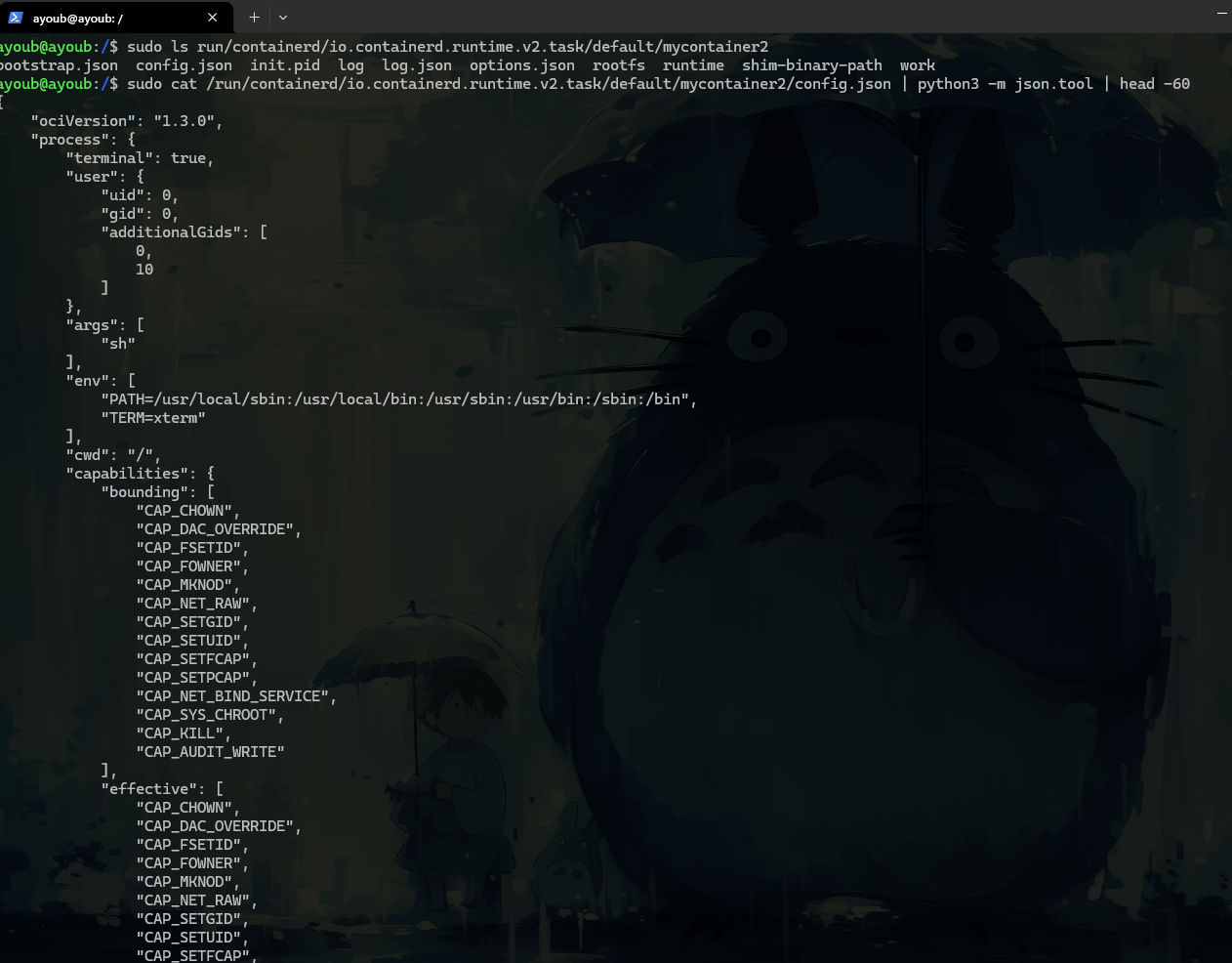
so what is the different between config.json that we wrote it in phase 1 and this one
Phase 1 (i wrote it)          Phase 2 (containerd generated it)
────────────────────────────────────────────────────────────────
"ociVersion": "1.2.1"           "ociVersion": "1.3.0"  (newer)
"args": ["sh"]                  "args": ["sh"]          ✅ same
"uid": 0, "gid": 0              "uid": 0, "gid": 0      ✅ same
"terminal": true                "terminal": true         ✅ same
3 capabilities                  14 capabilities          ← more permissive
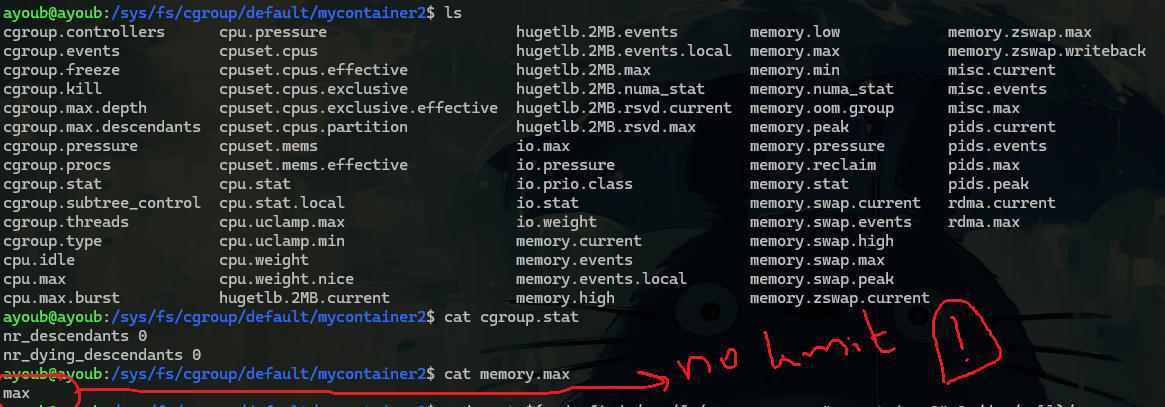
This maps directly to Kubernetes:
# No limits set → memory.max = max
containers:
  - name: app
    image: busybox

# Limits set → memory.max = 67108864
containers:
  - name: app
    image: busybox
    resources:
      limits:
        memory: "64Mi"
let’s Confirm the Shim Ownership
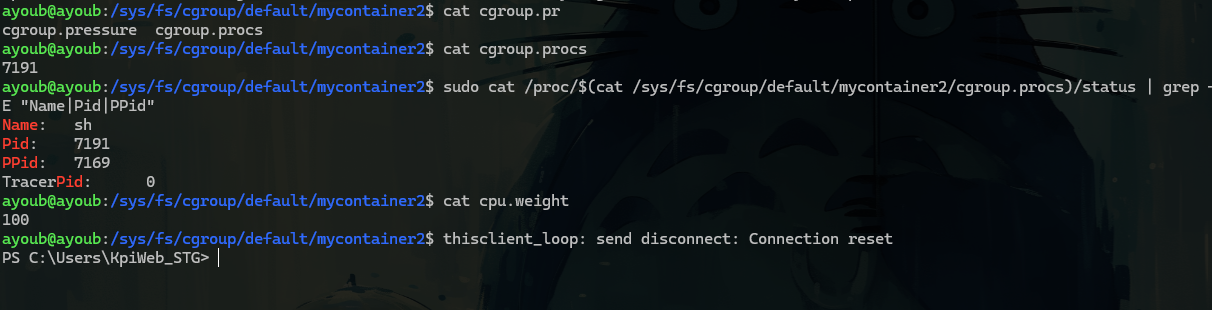
full pic
systemd (PID 1)
    └── containerd (PID 996)          ← daemon, always running
            └── containerd-shim (PID 7169)   ← spawned per container
                    └── sh (PID 7191)         ← our container


/sys/fs/cgroup/default/mycontainer2/
    cgroup.procs  = 7191              ← kernel tracking sh
    memory.max    = max               ← no limit set
    cpu.weight    = 100               ← default weight

/run/containerd/.../mycontainer2/
    config.json                       ← auto-generated OCI bundle
    rootfs/                           ← extracted image layers
    init.pid                          ← contains 7191
**Every single piece we manually did in Phase 1 — containerd automated it.** Same kernel primitives. Same OCI spec. Same cgroup files. Just automated.
Phase 2 Complete ✅
Phase 3 — Swap runc for crun
this is actually interesting part cuz we’ll change the runtime from runc to crun and we’ll see that containerd doesn’t care about who is running (same behavior)
first let’s find the containerd’s cofig file
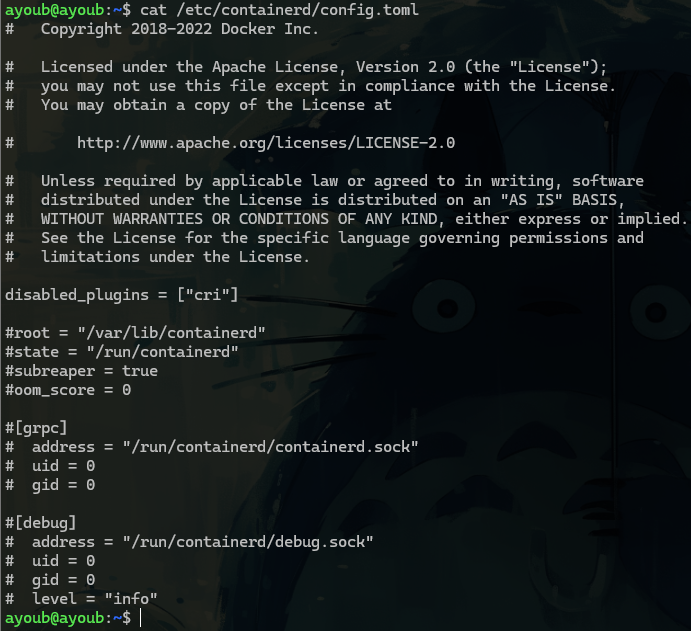
there is no runtime section cuz containerd used the default => runc
let’s edit the config file so explicitly setup the crun
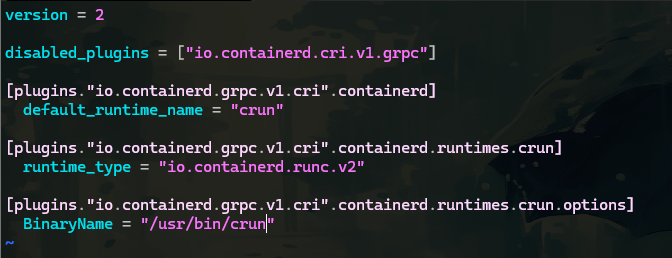
let’s restart the containerd service
i’m still here i don’t know maybe runc is hardcoded in the Shim Binary Itself ?